Think Before You Click: How to Spot a Phishing Email in 5 Seconds

April 11, 2025

Phishing attacks can compromise your entire organisation — learn how to detect them at a glance with this fast, practical guide.

Phishing emails remain one of the most common and dangerous cyber threats to individuals and organisations alike. Cybercriminals are becoming increasingly sophisticated, making it vital for every email user to be able to quickly spot the signs of a phishing attempt. At CyberGen Security, we specialise in phishing training and awareness to help protect your business from online threats.


In this guide, we’ll break down exactly how to spot a phishing email in five seconds or less – with visual examples, actionable tips, and essential facts that both technical and non-technical readers can apply instantly.

How to Spot a Phishing Email in 5 Seconds

Here are the five key elements to look for at a glance. If you see any of the following red flags, treat the email as suspicious and report it to your IT or security team.

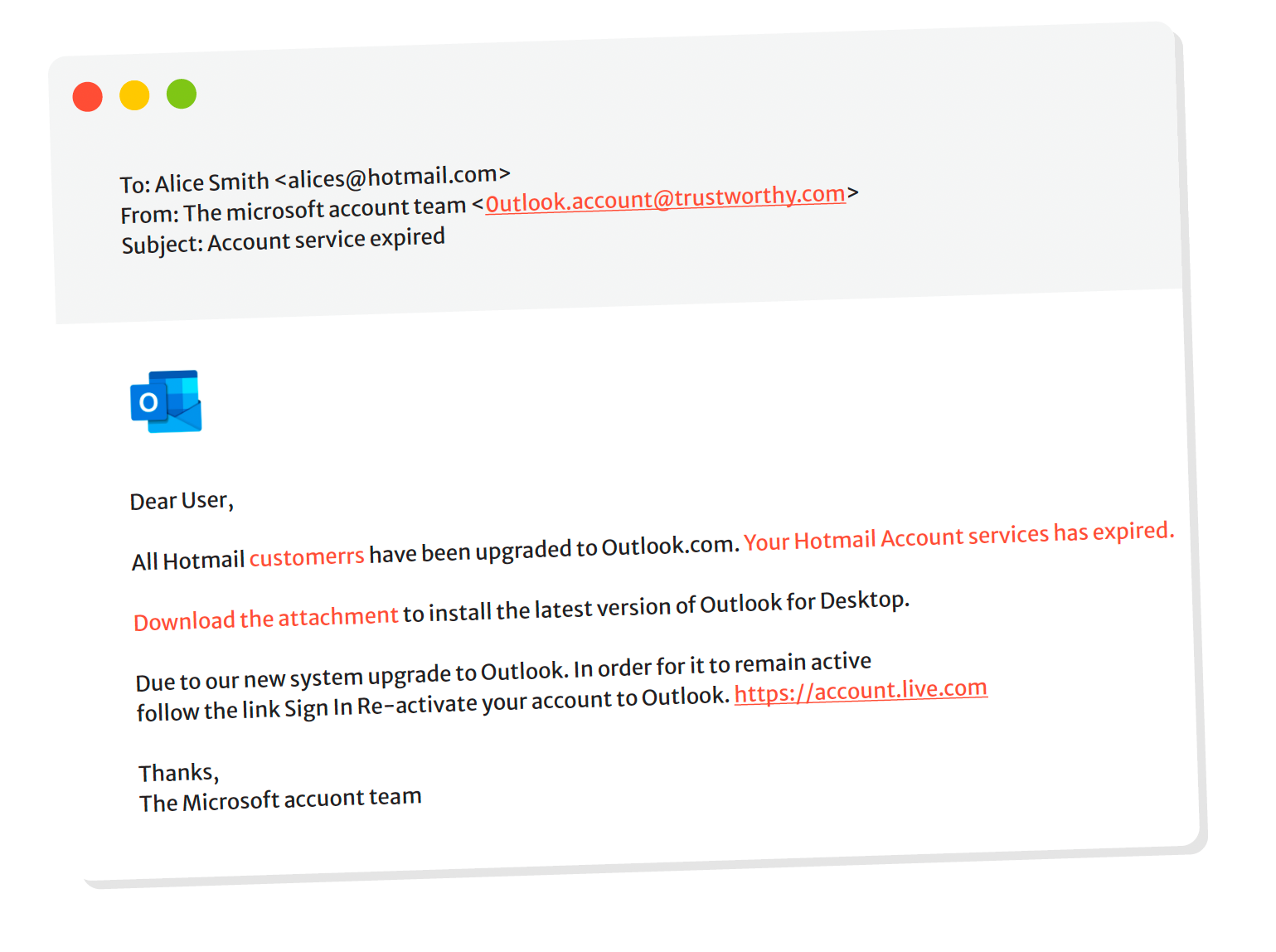
At first glance, an email might appear to come from a familiar sender. But look closely at the actual email address, not just the display name. Phishing emails often use addresses that mimic legitimate domains:


Example: support@micr0soft.com instead of support@microsoft.com


Quick Tip: Hover over the sender’s name to see the full address.

2. Look for Urgent or Threatening Language

Phishing emails often use fear or urgency to manipulate you into taking immediate action:


  • "Your account will be suspended in 24 hours!"
  • "Unusual login detected. Act now!"


Why it matters: This tactic creates panic, bypassing your critical thinking.

3. Inspect the Links Before Clicking

Hover your mouse over any link (without clicking) to preview the destination URL. If it looks suspicious or doesn’t match the sender’s domain, do not click.


Example: A link labelled "www.paypal.com" may point to http://secure-paypa1.com/login .

4. Check for Generic Greetings

Legitimate companies will usually address you by name. Phishing emails tend to use generic greetings:


  • "Dear Customer"
  • "Hi User"


Note: Misspelled names or inconsistent formatting can also be red flags.

5. Be Wary of Unexpected Attachments

If you receive an unexpected file attachment – especially if it’s a .zip, .exe, or Word document with macros enabled – be extremely cautious.


Malicious files can install malware, ransomware, or keyloggers onto your device.

More Phishing Red Flags to Watch For

Spelling and grammar errors

• Unusual formatting or fonts

• Requests for personal or financial information

• Suspicious domain names that resemble real ones

• Fake logos or brand inconsistencies

Real-World Example: Phishing Email Breakdown

Subject: Important Notice Regarding Your Tax Refund


From: hmrc@taxnotice-gov.co.uk

• Greeting: "Dear Customer"

• Link: http://hmrc-rebate-info.com

• Urgency: "Respond within 24 hours or your refund will be cancelled."


Verdict: Phishing


Why: Suspicious domain, generic greeting, urgency, and link mismatch.

What to Do If You Suspect a Phishing Email

1. Do not click any links or download attachments

2. Report the email to your organisation’s IT or cybersecurity team

3. Delete the email after reporting

4. Run a malware scan on your device if you’ve already interacted with it

Protecting Your Organisation: The CyberGen Solution

At CyberGen Security, we offer bespoke phishing training and simulation campaigns to educate your team and reduce human error. Our services include:


• Real-world phishing simulation tests

• Tailored staff training sessions

• Ongoing awareness campaigns

• Instant reporting tools


Remember:  Technology can only go so far. Human awareness is your strongest line of defence.


FAQ: Common Questions About Phishing

Q: How common are phishing attacks in the UK?

A: According to Action Fraud, phishing was the most reported type of cybercrime in the UK in 2023, accounting for nearly 80% of email-related threats.


Q: What should I do if I clicked a phishing link?

A: Disconnect your device from the internet, report the incident to IT, change your passwords, and run a full antivirus scan immediately.


Q: Can spam filters block all phishing emails?

A: No. While spam filters are effective, sophisticated phishing emails often bypass them. User vigilance is essential.


Q: Is phishing only done via email?

A: No. Phishing can also occur via text messages (smishing), phone calls (vishing), social media, and QR codes (quishing).


Q: How often should phishing training be conducted?

A: CyberGen recommends conducting phishing training at least quarterly, with monthly awareness campaigns for high-risk industries.

Final Thoughts

Phishing attacks are not going away – they’re evolving. But by learning to identify suspicious emails in just five seconds, you empower yourself and your team to defend against one of the most persistent cyber threats.


If you’re ready to protect your organisation from phishing attacks, contact CyberGen today for expert training, simulations, and support.


Stay vigilant. Think before you click.

Person typing on laptop, with cloud, documents, and security icons overlaid, suggesting cloud computing.
January 18, 2026
If attackers tested your systems tomorrow, what would they find? Discover how modern penetration testing exposes real attack paths, identity weaknesses, and hidden misconfigurations before they become breaches.
Person using computer with multiple screens displaying security shields and code in blue hues.
January 10, 2026
CTEM strengthens cyber resilience by continuously identifying, prioritising and reducing real-world cyber exposure for UK organisations.
Man looking intently at a computer screen displaying a warning symbol within a shield. Dark blue background.
January 4, 2026
Learn the real cost of penetration testing and pen testing in the UK in 2026, including pricing factors, average costs, and how to budget effectively.
A human face with cracks and glowing red eyes, overlaid with digital code and a red triangle symbol.
January 1, 2026
Ransomware in 2026: an overview of active and emerging threat groups, tactics, and trends—covering how attacks evolve, who’s driving them, and what organisations can do to reduce risk and recover fast.
Cybergen and Flashpoint graphic: headline
December 12, 2025
Cybergen partners with Flashpoint to enhance threat intelligence, giving organisations deeper visibility, proactive defence, and faster response to cyber threats.
Gold fishing hook with chain, in front of a computer screen displaying email icons.
December 12, 2025
Explore how travel companies are fighting booking fraud and phishing with advanced security, awareness training, and stronger authentication to protect customers.
People walk toward Tower Bridge in London, a modern glass building and the City Hall dome are in the background.
December 7, 2025
A full guide on how public sector agencies strengthen digital security through strong controls and modern practices.
Laptop on desk with holographic financial charts displayed in an office setting.
December 3, 2025
A detailed guide on why LegalTech platforms must strengthen cyber defences to protect data, clients and services.
Cars driving on a multi-lane highway, with digital sensor overlays. Urban setting.
November 25, 2025
Explore cybersecurity risks in autonomous driving systems and learn practical steps to protect connected vehicles. This detailed guide explains threats, safety measures and expert insights for stronger defence.